How to repair a Database via phpMyAdmin in cPanel

1. Log into your cPanel account.

2. In the Databases section, click on the phpMyAdmin icon.


3. In the left side-bar, Click on the expand button to expand the database like "example".


4. Under your cPanel username, you can see a list of all databases. Select the appropriate database which you want to repair.


5. Scroll down and mark Check All then click on the Drop-down option and select Repair table.
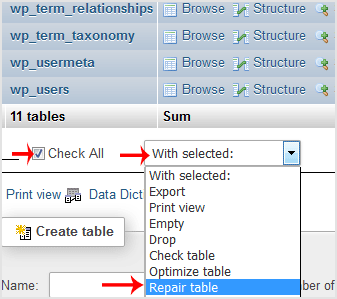

If the table successfully repaired, then it will show an Ok message; otherwise, it will show some error on a few tables like "Error unknown engine" related errors.

  • 3 Users Found This Useful
  • Databases, phpMyAdmin
Was this answer helpful?

Related Articles

How to create a Database Username in cPanel

1. Log into your cPanel account. 2. In the Databases section, click on MySQL Databases Icon. 3....

How to create a Database in cPanel

1. Log into your cPanel account.2. In the Databases section, click on MySQL Databases Icon. 3. In...

How to delete a Database in cPanel

1. Log into your cPanel account. 2. In the Databases section, click on MySQL Databases Icon....

How to add a User to a Database and add privileges

1. Log into your cPanel account. 2. In the Databases section, click on MySQL Databases Icon. 3....

How to import a Database via phpMyAdmin in cPanel

1. Log into your cPanel account.2. In the Databases section, click on the phpMyAdmin icon.3. In...

Powered by WHMCompleteSolution