How to change your cPanel Style/Theme

Switching over to another cPanel theme with a different style is easy, and there are two ways to do so.

First method: Paper Lantern Theme.
1. Log into your cPanel account.


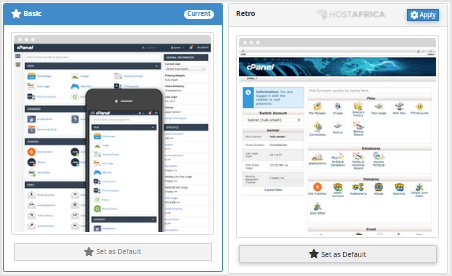
2. In the Preferences section, click on the Change Style Icon.

 

3. You will see a lot of themes on the themes page. Just select the one you like and click on Apply.

Second method: Change the theme instantly (Retro X3 Theme Only)
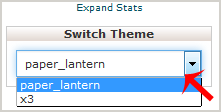
1. We assume you are already logged into your cPanel account. In your cPanel account near the left side of the page, you should see a Switch Theme option with a drop-down menu.

2. Choose your favorite theme from the drop-down menu, and it will apply automatically.
  • 1 Users Found This Useful
  • cPanel, Styles, Themes
Was this answer helpful?

Related Articles

How to check the Disk Usage of a Directory and Bandwidth Usage

If you are receiving a disk space usage warning and don't know which folder is using too much...

How to create a new folder or files in the cPanel File Manager

1. Log into your cPanel account. 2. In the Files section, click on the File Manager Icon. 3....

How to upload files via the cPanel File Manager

If you don't want to use a 3rd party FTP Software, you can use the cPanel's inbuilt File...

How to access cPanel Web Disk

You can use cPanel login details to access your Web Disk, which supports various operating...

How to add a CNAME Record in cPanel using the DNS Zone Editor

CNAME records are referred to as alias records since they map an alias to its canonical name. You...

Powered by WHMCompleteSolution